Beyond CRUD: Building Reliable Software Systems · Part 10
New to this series? Start with Part 1
CQRS Explained: Separating Reads and Writes for Scalable Systems
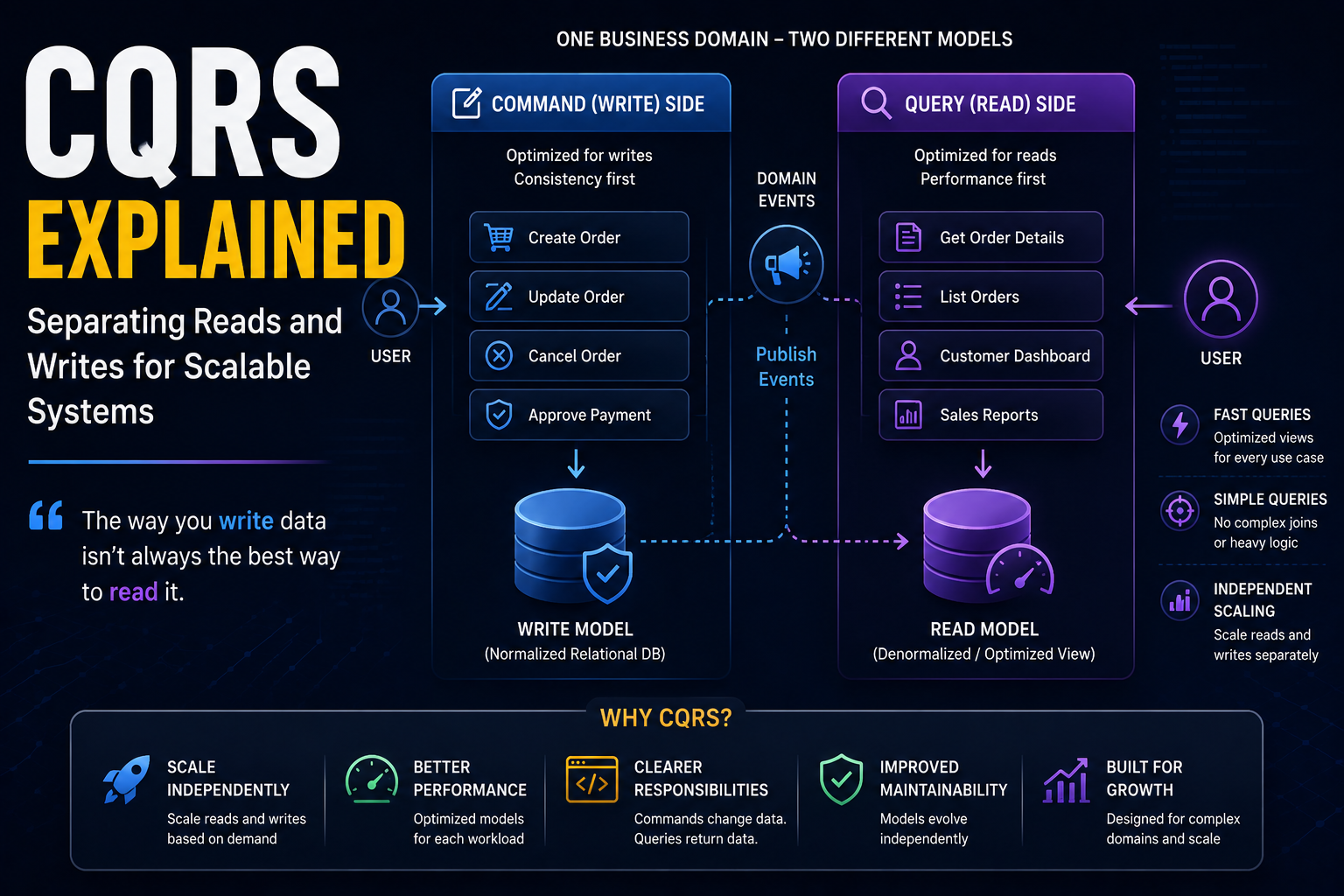
“The way you write data isn’t always the best way to read it.”
Imagine you’re building an online marketplace. Every day, thousands of customers browse products, place orders, track deliveries, and review their purchase history. At the same time, administrators manage inventory, warehouse staff update shipments, finance teams generate reports, and recommendation engines continuously analyze customer behavior.
From a user’s perspective, everything appears seamless. Behind the scenes, however, the application is performing two fundamentally different kinds of work. Some requests are changing data: a customer places an order, an administrator updates inventory, a payment is processed, or a shipment is marked as delivered. Other requests simply read data: customers search for products, managers open dashboards, support agents review order histories, and executives generate monthly reports.
At first, it’s tempting to handle both using the same database tables and the same application models. After all, an order is an order. Whether you’re creating it or displaying it, why shouldn’t the same model work for both? For many applications, that’s exactly what happens. The same entity is used for inserting records, updating records, validating business rules, and serving data to the user interface.
As applications grow, however, this approach begins to reveal its limitations. The information required to create an order is often very different from the information required to display one. Creating an order might require validating inventory, calculating taxes, applying discounts, verifying payment details, and enforcing business rules. Displaying an order, on the other hand, may require customer information, shipping updates, product images, payment status, warehouse progress, and delivery estimates, all combined into a single view optimized for the user.
Trying to satisfy both responsibilities with one model often leads to increasingly complicated code. The write model becomes cluttered with fields needed only for reporting, the read model becomes constrained by rules that exist only for data modification, queries grow more complex, performance begins to suffer, and developers start adding workarounds that make the system harder to maintain.
Eventually, an important realization emerges.
The way we write data isn’t necessarily the best way to read it.
That simple observation led to a pattern known as Command Query Responsibility Segregation, more commonly called CQRS. Rather than forcing one model to satisfy two very different responsibilities, CQRS separates them completely. Commands become responsible for changing data, queries become responsible for reading data, and each side can then evolve independently, optimized for its own purpose. Before exploring how CQRS works, let’s first understand why combining reads and writes into the same model eventually becomes a problem.
Why One Model Eventually Becomes a Problem
When most applications begin, life is simple. Suppose you’re building a loan management platform. A borrower submits a loan application. The application validates the input, saves the record, and later retrieves the same information whenever a loan officer opens the application. The same model handles both writing and reading.
1
LoanApplication
Everything works perfectly. As the platform grows, however, different users begin asking for different views of the same information. A loan officer wants to see repayment history, guarantors, collateral, risk score, and supporting documents on one screen; finance wants reports showing outstanding balances grouped by branch; executives want dashboards displaying portfolio performance; and customers simply want to know whether their application has been approved.
Notice what’s happening: everyone is looking at the same business entity, but nobody wants exactly the same data. To satisfy these different requirements, the application gradually starts joining more tables.
1
2
3
4
5
6
7
8
9
10
11
12
13
14
15
Loan

JOIN Customer

JOIN Branch

JOIN RiskAssessment

JOIN LoanOfficer

JOIN Repayments

JOIN Documents

JOIN Guarantors
The queries become larger, response times increase, and the code becomes harder to maintain. Ironically, the information required to display a loan has become far more complicated than the information required to create one. This is where many systems begin struggling. The write model keeps accumulating fields that only reports need, the read model becomes constrained by business rules that only matter during updates, and eventually one model is trying to solve two completely different problems.
Commands and Queries Are Different
One of the core ideas behind CQRS is recognizing that not every request has the same purpose. Some requests change data; others simply read it. These are fundamentally different operations. A command tells the system to perform an action. For example:
- Create Order
- Approve Loan
- Reserve Inventory
- Charge Payment
- Register Customer
Commands represent intent. They usually contain business validation, enforce rules, and modify application state. A query, on the other hand, doesn’t change anything. Its only responsibility is returning information. For example:
- Get Customer Profile
- List Outstanding Loans
- View Order History
- Search Products
- Display Dashboard
Queries don’t perform business logic. They answer questions. This distinction may seem small, but in reality, it changes how applications are designed.
What Is CQRS?
CQRS stands for Command Query Responsibility Segregation. Despite the intimidating name, the underlying idea is surprisingly simple. Instead of using one model for everything, CQRS separates the write side from the read side. Commands become responsible for modifying data, and queries become responsible for retrieving it. Conceptually, the architecture looks like this.
1
2
3
4
5
6
7
8
9
10
11
12
13
14
15
16
17
                Application

                     │

      ┌──────────────┴──────────────┐

      │                             │

   Commands                     Queries

      │                             │

Write Model                  Read Model

      │                             │

Database                 Optimized View
The important thing to notice is that the read model no longer has to look like the write model. Each side is free to evolve independently.
The Write Model
The write model exists to protect business rules. Suppose a customer places an order. The application needs to verify inventory, calculate discounts, validate payment, reserve stock, and create the order. All of those steps belong on the write side. The write model isn’t concerned with how information will later appear on a dashboard. Its only responsibility is ensuring the business operation is correct. Think of it as the gatekeeper for your data. Nothing enters the system without passing through the write model.
The Read Model
The read model has a completely different job. Its responsibility isn’t enforcing business rules, it’s returning information as efficiently as possible. Imagine displaying an order summary. The customer expects to see:
- Order number
- Customer name
- Product images
- Shipping status
- Payment status
- Delivery estimate
- Total price
The write model probably stores all of this across multiple tables, but the read model doesn’t have to. Instead, it can store exactly the shape required by the user interface, so instead of executing six joins every time someone opens an order, the read model may already contain everything in one place.
This dramatically simplifies queries while improving performance.
Why This Improves Performance
Suppose an online store receives ten thousand requests every minute. Only five hundred of those requests create or update orders. The remaining nine thousand five hundred simply display information. Traditional CRUD applications often force both workloads through the same models and database structures. CQRS recognizes that reads and writes have completely different characteristics. Reads are usually far more frequent, while writes are usually more complicated. By separating them, each side can be optimized independently: the write model focuses on correctness, the read model focuses on speed, and neither compromises the other.
A Real-World Example
Think about YouTube. Uploading a video and watching a video are two completely different operations. Uploading requires validation, virus scanning, metadata extraction, thumbnail generation, transcoding, and storage. Watching a video requires none of those things. The viewer simply wants the video to start playing immediately. Trying to optimize both operations using exactly the same model would make little sense.
CQRS applies the same principle to business applications. The model responsible for creating data doesn’t have to be the same model responsible for presenting it. Recognizing that difference is the first step toward understanding why CQRS has become such a popular architectural pattern in modern backend systems.
At this point, we’ve separated reads from writes conceptually. The next question naturally follows:
If the read model and write model are separate, how do they stay synchronized?
Keeping the Read Model Up to Date
One of the first questions developers ask after learning about CQRS is:
“If my read model is separate from my write model, how does it stay up to date?”
The answer depends on the architecture, but in most modern systems, the read model is updated using events.
Suppose a customer places an order. The write model validates the request, checks inventory, processes payment, and commits the transaction. Once the transaction succeeds, an event such as OrderCreated is published, and one or more components responsible for maintaining the read model receive that event and update their own optimized view of the data.
Conceptually, the flow looks like this:
1
2
3
4
5
6
7
8
9
10
11
12
13
14
15
16
17
18
19
20
21
22
23
24
25
26
27
28
29
30
31
32
33
34
35
36
37
38
39
Customer

      │

      ▼

Command

(Create Order)

      │

      ▼

Write Model

      │

      ▼

Database

      │

      ▼

OrderCreated Event

      │

      ▼

Read Model Updated

      │

      ▼

User Queries Data
Notice something important: the user’s query never touches the write model. Instead, it reads from a model specifically designed for displaying information.
Eventual Consistency
Because the read model is updated after the write completes, there is usually a short delay before the latest information becomes visible. This is known as eventual consistency. Imagine placing an order on a large e-commerce platform. The checkout page immediately confirms that your purchase was successful, but if you refresh your order history a fraction of a second later, the new order might not appear immediately. A moment later, it does. Nothing is wrong: the write completed instantly, and the read model simply needed a short amount of time to catch up. For many applications, this tiny delay is perfectly acceptable. Users rarely notice a difference measured in milliseconds or even a few seconds, and the benefit is that reads become dramatically faster and easier to scale.
Does CQRS Require Microservices?
One of the biggest misconceptions about CQRS is that it only works in microservice architectures. It doesn’t. CQRS is simply a design pattern. A single monolithic application can separate its command handlers from its query handlers just as effectively as a distributed system. Likewise, CQRS doesn’t require Kafka, RabbitMQ, Event Sourcing, or multiple databases. Many applications implement CQRS using a single database while maintaining separate command and query models inside the same application. As systems grow, those models may eventually evolve into separate databases or services, but that’s a scaling decision, not a requirement of the pattern itself.
When Should You Use CQRS?
CQRS isn’t a solution to every problem. Many applications work perfectly well using traditional CRUD architecture. If your application has simple business rules, relatively small datasets, and straightforward queries, introducing CQRS often adds unnecessary complexity. On the other hand, CQRS becomes increasingly valuable when reads and writes have very different characteristics. Common examples include:
- High-traffic e-commerce platforms.
- Banking and financial systems.
- Loan management platforms.
- Logistics and supply chain applications.
- Reporting and analytics dashboards.
- SaaS products with complex administrative views.
In these systems, the information required to display data is often very different from the information required to modify it. Separating those responsibilities makes the application easier to optimize and easier to maintain.
CQRS vs Traditional CRUD
A useful way to understand CQRS is to compare it with the architecture most developers already know.
| Traditional CRUD | CQRS |
|---|---|
| One model for reads and writes | Separate models for reads and writes |
| Simpler to build | More flexible at scale |
| Easier for small systems | Better suited for complex domains |
| Queries often become increasingly complex | Read models are optimized for specific use cases |
| Business rules and presentation concerns frequently mix together | Responsibilities remain clearly separated |
Neither approach is universally better. CRUD is an excellent choice for many applications. CQRS becomes valuable when the complexity of the domain begins to outweigh the simplicity of using a single model.
Common Mistakes
One mistake developers frequently make is adopting CQRS simply because they’ve heard it’s a “best practice.” Like every architectural pattern, CQRS introduces additional moving parts. You’ll often have separate models, additional event handling, and the possibility of eventual consistency. If those complexities don’t solve a real business problem, they’re simply unnecessary overhead. Another common mistake is trying to create one read model that satisfies every possible screen. The real strength of CQRS lies in allowing each query to have a model optimized for its own purpose. A customer dashboard, an administrative report, and a mobile application may each deserve different read models. Finally, don’t confuse CQRS with Event Sourcing. Although the two patterns are often used together, they solve different problems. CQRS separates reads from writes, while Event Sourcing stores state as a sequence of events. You can implement one without the other.
Bringing It All Together
Throughout this series, we’ve gradually built a collection of patterns that solve different reliability and scalability challenges.
| Concept | Question It Answers |
|---|---|
| Idempotency | What if the same request arrives twice? |
| Race Conditions | What if multiple requests modify the same data simultaneously? |
| Database Transactions | How do I keep database operations atomic? |
| Isolation Levels | What should concurrent transactions be allowed to see? |
| Distributed Locks | How do multiple application instances coordinate work? |
| Outbox Pattern | How do I reliably publish events after committing data? |
| Saga Pattern | How do multiple services complete one business process reliably? |
| CQRS | Should the same model be responsible for both reading and writing data? |
Notice how the series has gradually expanded in scope. We began by making individual API requests reliable, then learned how to coordinate transactions, communicate between services, and manage distributed business workflows. CQRS adds another important lesson: sometimes the best way to scale an application isn’t by making one model do everything, but by giving different responsibilities to different models.
Final Thoughts
One of the biggest lessons in software architecture is that different problems deserve different solutions. Reading data and writing data may involve the same business entity, but they rarely have the same requirements. Writes prioritize correctness, validation, and enforcing business rules; reads prioritize speed, simplicity, and delivering information in the shape users actually need. CQRS embraces this difference instead of trying to hide it. For small applications, a traditional CRUD architecture is often the right choice. As systems become larger and business requirements become more demanding, separating reads from writes can lead to simpler queries, clearer responsibilities, and applications that scale far more gracefully. Like every pattern we’ve explored in the Beyond CRUD series, CQRS isn’t about making software more complicated. It’s about choosing the right level of complexity to solve the problem in front of you.
What’s Next?
So far, we’ve explored several patterns that improve reliability, scalability, and maintainability. One question still remains: how do all these patterns fit together to build applications where services communicate entirely through events instead of direct API calls?
In the next article, we’ll explore Event-Driven Architecture Explained: Building Systems That React to Events, where we’ll connect concepts like the Outbox Pattern, Saga Pattern, and CQRS into a cohesive architectural style used by many modern distributed systems.